

Project Gorgon Dynamic Storage Explained
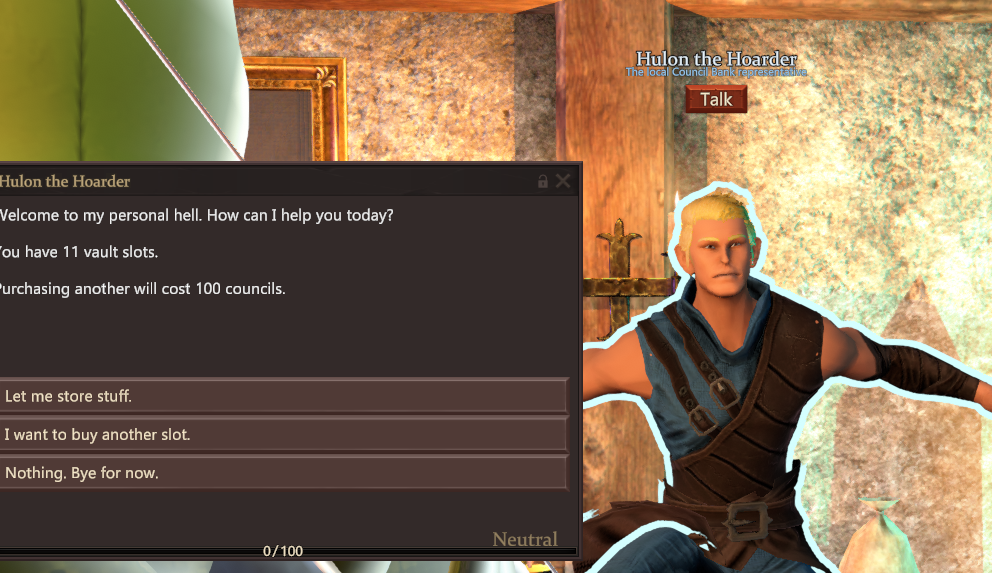
Dynamic Storage in Project Gorgon is your shared bank system that expands as you progress. Once you reach Serbule, you unlock the Dynamic Storage Chest, which lets you store items safely and access them across that zone. As you gain Favor with certain NPCs, more storage options unlock and connect together.
Inventory management becomes a major part of the game. Understanding how Dynamic Storage works early will save you time and stress later.
What Dynamic Storage Actually Is
Dynamic Storage, formerly called the Community Chest, is your first real bank. You unlock it in Serbule.
Once unlocked, you can:
Store items permanently
Access connected storage from other storage NPCs in the same zone
Avoid losing items by dropping them on the ground
Items left on the ground disappear after a while and can be picked up by other players. Storage is the safe option.
Talking to every NPC at least once is important. NPC names will not appear in item information lists until you meet them.
Inventory Storage Versus Dynamic Storage
There are different types of storage in Project Gorgon. Dynamic Storage is not your backpack.
Inventory Storage is your personal backpack. It increases through:
Leveling Endurance
Equipment with inventory treasure effects
Crafting pockets onto gear
Belts from Shamanic Infusion or Toolcrafting
Pocket Expander Potion
Words of Power that temporarily increase slots
Dynamic Storage is separate from your inventory. It is meant for long term item holding.
Council Vault Storage
The Council Vault is another major shared storage system.
You unlock and expand it through Hulon in Serbule. Slots are purchased with Councils and increase in cost as you expand.
Examples of slot costs:
Slot 1 costs 50 Councils
Slot 2 costs 100 Councils
Slot 25 costs 900 Councils
Slot 49 costs 8000 Councils
Slot 62 costs 20000 Councils
Slot 63 costs 25000 Councils
Slots above 63 increase by 5000 each
Slot 81 costs 115000 Councils
Council Vault Storage is shared and accessible from multiple zones through Council Storage Machines.
NPC Storage And Favor Based Expansion
Several NPCs offer personal storage. The amount of storage usually scales with Favor level.
Once you unlock storage in a zone:
You can access it from other storage NPCs in that same zone
You can also access it from certain interactable objects like bookshelves or tables
Some NPCs restrict what items you can store. Always check the limits before using their storage.
Transfer Chests And Account Storage
Transfer Chests allow item movement between characters on the same server.
You can find Transfer Chests in:
Hulon’s shop in Serbule
Rahu near the Council Storage Machine
Sun Vale near guild storage
Red Wing Casino in Qatik’s room
These chests are not included in the isearch command. You must check them manually.
Special Storage Systems
Project Gorgon has several unique storage types tied to skills and events.
Examples include:
Carpentry Storage Crates that last 5 minutes and scale from 4 to 28 slots
Druid Storage unlocked through Dreva’s Blessings during event windows
Lycanthropy Storage at the Altar of Norala during Full Moon
Warden Storage in the Sacred Grotto scaling up to 132 slots
Fae Pocket Dimension storage unlocked through Fae race skill levels
Ri Shin Shrine Storage during Winter Holiday events
Qatik Storage in Red Wing Casino purchased with Red Wing Tokens
Povus storage scaling from nightly town quests
Each system has its own rules, limits, and unlock conditions.
Practical Summoning And Stow Features
Once you unlock Practical Summoning through Teleportation:
You can summon crafting materials from nearby storage in the same zone
You cannot summon from Council Vault or Guild Storage
Completing Wintria Irasce’s Care Package quest unlocks the Stow Items in Nearby Storages button. This automatically moves items from your inventory into nearby storage if that item already exists there.
This saves a lot of time during crafting or sorting sessions.
Finding Items With Isearch
Project Gorgon includes a powerful search tool.
Use:
/isearch ItemName to find all matching items in storage
/isearch +ItemName for exact matches
The magnifying glass in your inventory window also opens this search tool.
It does not search Guild Storage or Transfer Chests.
Best Early Storage Advice
Do not panic about early items. Most low level materials are easy to re obtain.
Use Item Information often. Right click any item to see:
Who buys it
Who accepts it as a gift
If it is used in a recipe
If it is a quest objective
Sell or gift items instead of hoarding everything. Storage expands as you progress, and early clutter slows you down.
Dynamic Storage in Project Gorgon is designed to grow with you. Learn how each storage type works, unlock them steadily, and your inventory problems become much easier to manage.

For more, check out our Project Gorgon Hub page.